






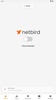




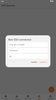
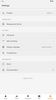

NetBird is a network app that allows you to connect your Android device to a NetBird infrastructure using encrypted tunnels based on WireGuard. You can use it to access other devices on your network, servers, or internal services, whether managed from NetBird Cloud or from a server you have set up on your own.
Connect your smartphone in a few easy steps
When you boot up NetBird, you can choose a NetBird cloud server, or use your own. To add the device, you can log in with the SSO provider configured in your organization or use an access key, which is especially useful when you are deploying multiple computers. After granting Android permission to create the VPN connection, the device is registered as a peer within the network.
Control which apps pass through the private network
NetBird features split tunneling to select which apps use the NetBird connection and which continue to use the standard Android connection. When no app is selected, all traffic goes through the tunnel. In turn, you can check the available devices on your network, find details on each peer, and review their routes from the app. There is also an exit node selector to route traffic through another device on the network when permitted by your configuration.
Switch environments with profiles
If you use multiple accounts or servers, you can maintain a distinct configuration for each profile. You have the option to rename them, switch between them from the selector, and see which account each one is associated with. There is also a large main control for connecting and disconnecting, different status indicators in the notifications, and a resources section where you can quickly locate items on the network. The app also manages network changes, for example when switching from Wi-Fi to mobile data, without having to start the entire connection engine again.
Advanced settings for a network tailored to your needs
NetBird works with IPv6 and forces the use of a relay when a P2P connection is not viable. You can also change the management server from within the app itself to use a self-hosted installation, although this deletes the device's current configuration and requires confirmation.
My experience with NetBird
After installing the app, I used the default server during the initial setup. I pressed the Connect button, accepted the permissions to create the VPN, and completed the login from the browser via SSO. Afterwards, I accessed the peer information to check the address and the available routes within the network. Overall, I found it to be an excellent option for browsing the Internet privately and allowing me to choose which server I use to connect.
What I liked most about NetBird and what could be improved
· What I liked most: The built-in split tunneling and SSH client turn the app into more than just a simple VPN switch, especially when you need to access multiple resources from your smartphone.
· What could be improved: I would add even more specific controls to automate the connection and manage complex profiles from Android directly without relying so much on the administration panel.
Download the NetBird APK to connect your Android to private networks from NetBird with WireGuard and multiple customization options, including split tunneling.
NetBird is for you if
✓ You need secure, WireGuard-based access from Android to your private servers and internal services
✓ You value granular control via split tunneling, deciding which apps and routes use NetBird
✓ You prefer flexible profiles and seamless switching between accounts, servers, and changing Wi‑Fi/mobile networks
Requirements (Latest version)
- Android 8.0 or higher required





















Comments
There are no opinions about NetBird yet. Be the first! Comment